Retro gaming is making a big comeback. People love old school games from Nintendo, Play Station, Sega, and arcade systems. But today, gamers don’t want to stay stuck with old CRT TVs. They want a modern, portable, and flexible setup.
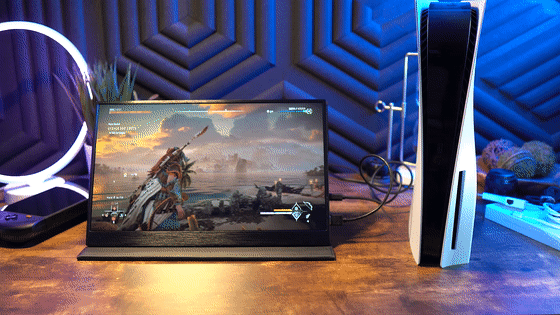
That’s where a portable monitor comes in. You can connect retro consoles and enjoy classic games anywhere your room, travel, or even a café.
In this guide, you will learn how to play retro consoles on modern portable monitors in a simple, easy way.
What is a Portable Monitor and Why Use It for Retro Gaming?

A portable monitor is a lightweight screen that you can carry anywhere. It works with laptops, consoles, mini PCs, and even retro gaming devices.
Unlike traditional TVs, a portable monitor is
- Lightweight and travel-friendly
- Easy to connect with HDMI or USB-C
- Energy efficient
- Perfect for small spaces
Retro gaming becomes much more enjoyable when you pair it with a gaming portable monitor, because it gives sharp visuals and smooth gameplay without needing a big setup.
Best Retro Consoles You Can Connect
Before setting up your monitor, you need to know which consoles work best
Classic Consoles
- Nintendo Entertainment System (NES)
- Super Nintendo (SNES)
- Sega Genesis
- PlayStation 1 (PS1)
Modern Retro Devices
- Nintendo Switch (retro games)
- RetroPie (Raspberry Pi system)
- Anbernic handheld consoles
- Evercade systems
Most of these devices connect easily to a portable display using HDMI or adapters.
How to Connect Retro Consoles to a Portable Monitor
Setting up is very easy. Follow these steps
Step 1: Check Ports
Most portable monitors support
- HDMI input
- USB-C input
Make sure your console matches one of these.
Step 2: Use Correct Cable
- HDMI to HDMI cable (most common)
- HDMI adapter if needed
Step 3: Power the Monitor
Some monitors need external power via USB.
Step 4: Switch Input Source
Select HDMI/USB-C from monitor settings.
Now your retro console is ready to play
Best Screen Size for Retro Gaming
If you want a smooth experience, screen size matters a lot.
A popular choice is the 18.5 inch monitor, because:
- It is big enough for clear visuals
- Still portable and lightweight
- Fits easily on desks or travel setups
- Perfect balance between size and comfort
This size is widely used in modern gaming portable monitor setups.
Best Settings for Retro Gaming Experience
To improve gameplay, adjust these settings
Brightness & Contrast
Keep brightness medium to avoid eye strain.
Aspect Ratio
Use a 4:3 ratio for old games (important for classic feel).
Resolution
Most retro games look best at:
- 720p or 1080p
Input Lag
Choose Game Mode if available for a smoother response.
Portable Monitor Setup Ideas for Retro Gaming
Here are some cool setup ideas
Travel Gaming Setup
- Portable monitor
- Nintendo Switch or handheld emulator
- Power bank
Desk Setup
- 18.5 inch monitor
- RetroPie system
- Wireless controller
Minimal Setup
- Small portable monitor
- Plug-and-play HDMI console
For more setup ideas, check this guide: Portable monitor guide
Why Gamers Prefer Portable Monitors Today
Modern gamers love portable monitors because:
- They are flexible
- Easy to carry anywhere
- Work with many devices
- Give a clean gaming experience
Many users upgrade from TVs to gaming portable monitor setups because of convenience and space saving.
Common Problems and Solutions
No Display Issue
Check HDMI cable connection
No Sound
Use external speakers or headphones
Screen Not Detected
Change input source on monitor
Advanced Tip for Retro Gaming Fans
If you want a premium experience, try using emulators on Raspberry Pi or PC. Combine it with a 18.5 inch monitor for a smooth retro arcade feel.
You can also explore this setup guide
Gaming portable monitor setup guide
Pros and Cons of Using Portable Monitors for Retro Gaming
Pros
- Highly portable
- Easy setup
- Affordable
- Works with many consoles
Cons
- Smaller than TV screens
- Needs external power sometimes
- Limited built-in speakers
Conclusion
Playing retro games on a modern portable monitor is one of the best ways to enjoy classic gaming in 2026. It gives you freedom, flexibility, and a clean setup without heavy TVs or complicated systems.
Whether you use a portable monitor, a gaming portable monitor, or a compact 18.5 inch monitor, the experience becomes smooth, fun, and highly portable.
Retro gaming is not just about nostalgia.it’s about enjoying old memories in a modern way.
FAQs
1. Can I connect old consoles to a portable monitor?
Yes, most retro consoles can connect using HDMI or adapters.
2. Is a portable monitor good for gaming?
Yes, especially for retro and casual gaming setups.
3. What size monitor is best for retro gaming?
An 18.5 inch monitor is one of the best balanced choices.
4. Do portable monitors have lag?
Good quality gaming portable monitors have very low input lag.
5. Can I use a portable monitor without a PC?
Yes, many consoles and devices connect directly without a PC.